
The Simple Guide for Small Business Owners to Optimize Campaign Landing Pages Without Hiring a Developer

A landing page is a key decision point in your conversion funnel. It can either help leads feel ready to move forward or increase your bounce rate.
Give visitors everything they need to feel confident enough to take action. And you can do that without a developer.
Let’s take a closer look at how you can optimize your campaign landing pages without having to be a tech wizard.
Copywriting and visuals are musts for quality landing pages
Here’s what to do on the writing and visual side of things to improve user experience and conversion rate optimization:
Use a strong headline, hero image, CTA button, and supportive subheads
Start with a strong hook that clearly states what the customer will get. This sets expectations for your target audience and improves user engagement.
For example:
“Grab 10 of Jordan Lee’s Most Popular Marketing Templates for Only $29!”
“Access 20 of Riley Chen’s Expert Design Tutorials for Only $25!”
“Unlock 15 of Taylor Morgan’s Best Fitness Plans for Just $22!”
After that, include a hero image of your product/service, followed by a call to action (CTA) button for people who want to buy right away. Follow that with subheads that guide the visitor through each phase of the decision-making process.
Here’s a great example:
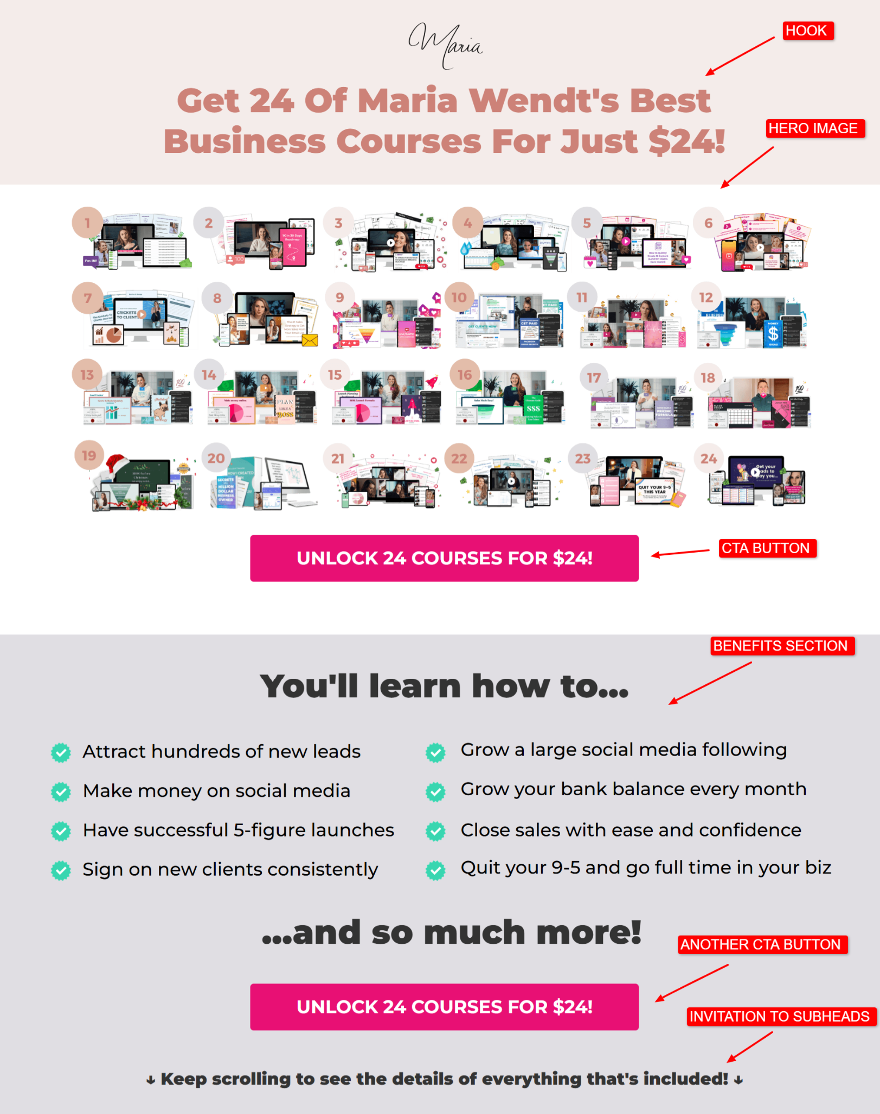
Image Source
Landing Page
Here are some solid subhead examples that can follow your introduction and hero image:
Include a benefits section to set the stage for the transformation the buyer will receive.
Include a “What’s included” section with more descriptive mock-up images (so your audience knows exactly what they’re getting).
Include a “Who it’s for” section that lists ideal customer types/buyer personas.
Add an objection-handling section for leads who are on the fence.
Have a testimonials section to build trust.
Include a “Value stack” or a “Value menu” section with prices.
Have a comparison section. Compare what you offer versus what the competition offers.
Include an “About Me” or “About Us” section so the lead can get to know you better. (Great for building emotional connections).
Add an FAQ section that covers the most common questions you get about your product/service.
More on these subsections in just a bit!
Give visitors an unmistakable next step
Choose only one key action step you want the audience to take.If you expect them to sign up for your email list, buy something, and join your webinar, the overwhelm could push them away.
Structure your CTAs so they feel like a natural next step. Start with direct language that mirrors the value of the offer. For example: “Get the template,” “Book your strategy call,” or “Download the guide.”
A/B test the copy you use to see which CTA language converts best. For instance, you might learn that “I NEED THIS” converts better than “UNLOCK THE COURSE.”
Sprinkle your CTAs before and after each subsection so readers get multiple chances to take action as they scroll.
Add a “What’s included” section with compelling mockups
Make the offer tangible. Show clean visuals of your product, templates, dashboard, or service structure. (You can use a landing page builder.)
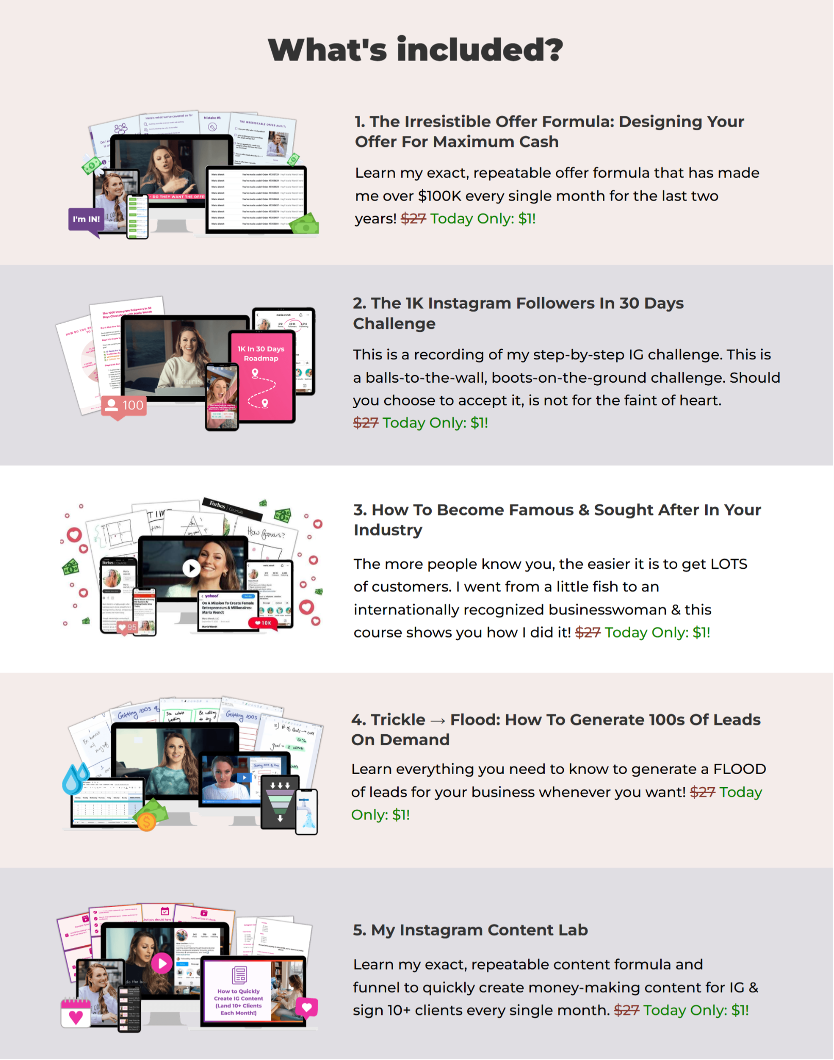
Image Source
What’s Included Section
Pair each visual with short descriptions that highlight what’s inside and how each piece supports the reader’s goal. This improves lead capture and helps position your content offer as a valuable lead magnet.
Include a “Who it’s for” section to filter and motivate
Describe the specific types of people or businesses that benefit most from your offer.
This helps qualified visitors immediately recognize that the offer matches their needs. (And helps you attract the right leads from paid traffic.)
For example: “Ideal for service providers, coaches, and consultants who want to scale their online businesses.”
This section aligns messaging with user personas and improves conversion rate quality.
Add an objection-handling section that builds trust
Address common concerns with calm, clear explanations. Speak to expected questions around time, cost, expertise, or results. For example: “Worried you won’t get results? If you’re not happy, we’ll refund your money at any time. No questions asked.”
This reduces friction and increases confidence before visitors complete sign-up forms.
Even small trust signals can influence whether a visitor stays on the page or leaves. Clear messaging, visible proof, and strong page structure work together to reduce hesitation and move visitors closer to conversion without making the experience feel overly sales-focused.
Use social proof to highlight outcomes
Include short customer stories that show transformations after using your product or service. A strong customer story can significantly increase conversion rates.
(Make sure to include customer names, photos, and locations to reinforce trust symbols and authenticity.)
Add a value stack that breaks down the offer with itemized prices
Show each part of your offer, assign a clear value to each, and then add them up so people can compare the total value to your price.
For example, if you’re selling a social media starter kit, your value stack might look something like this:
Landing page copy templates: $49 value
Conversion-focused landing page wireframes: $39 value
Quick-start video tutorial: $59 value
Hashtag swipe file: $29 value
Total value: $176
Your price: $39
Have a comparison section
Present a clear side-by-side chart that shows what you deliver compared to typical alternatives. Highlight benefits that matter most to your audience. (Like speed, support, ease, total cost, or expertise.)
Why an About Section Improves Trust
Share a short, authentic introduction to you or your team.
Include one reason you created the offer and one detail that shows credibility. This builds human connection and reassures new visitors that they’re in the right place.
Use FAQs to Reduce Purchase Friction
Answer real questions your audience brings up before taking action. Keep responses short, clear, and practical. This section often closes the final gaps in confidence and helps readers commit.
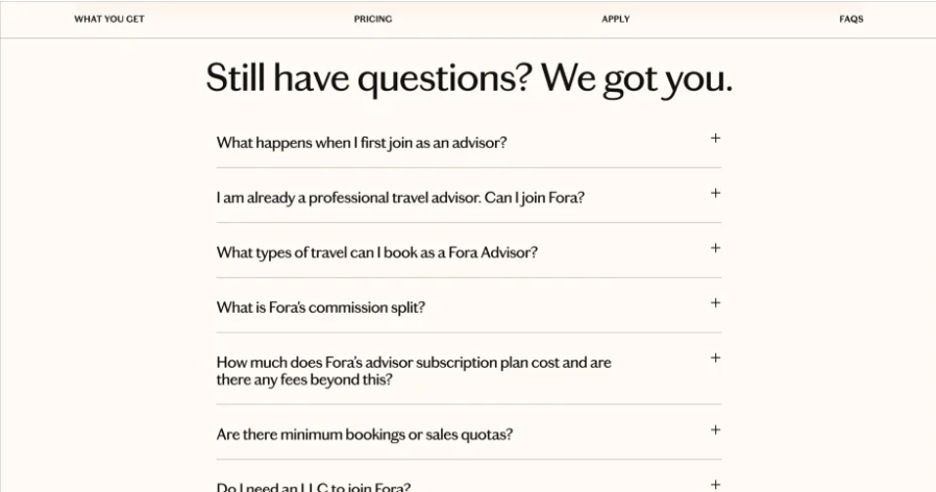
Image Source
FAQ Section
Once your landing page messaging and trust-building sections are in place, the next step is to ensure the experience performs smoothly across devices and varying traffic conditions. Technical optimization helps ensure visitors actually experience the page the way you intended.
Technical Campaign Landing Page Optimization Tips
Here’s what you need to do on the tech and SEO side to improve performance and UX:
Use visual A/B testing, form analytics, and heatmaps to guide improvements
Get deeper insight into how visitors interact with your landing page.
Use A/B tests to help you see which headline, layout, CTA text, or color choice gets people to take action.
Use form analytics to see where someone hesitates while filling out your sign-up form.
Use heatmaps to see exactly where people scroll, stop, click, and lose interest.
Together, these give you a live picture of what your visitors pay attention to, and what they skip. Tools like Unbounce, Instapage, or Leadpages make this easy. (Add Hotjar or Crazy Egg for even deeper behavioral insight.)
Beyond optimizing individual landing pages, many businesses are now using AI agents in Marketing to automate campaign planning, generate SEO-optimized content, monitor keyword performance, and continuously improve conversion strategies across multiple channels.
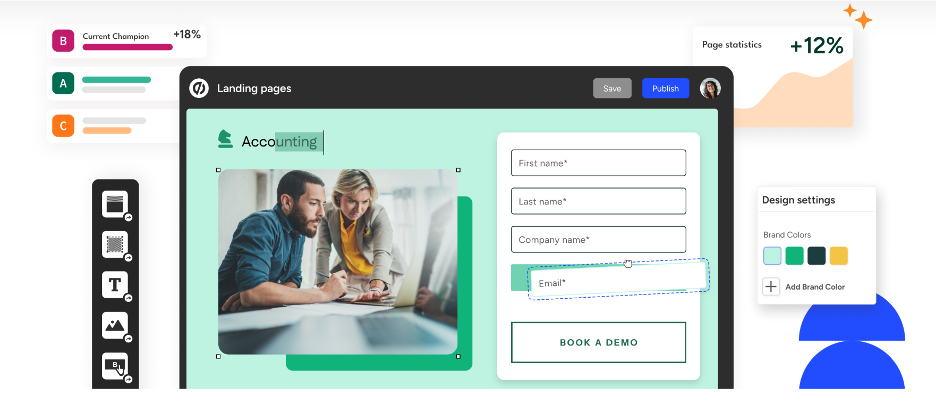
Image Source
Landing Page Builder
Include a target keyword with helpful semantic keywords
Target one clear keyword on your landing page, along with related terms that support search engine optimization.
Work the main keyword into:
The hook/introduction
Your first paragraph
Two main headers
Image ALT tags
The metadata
A subhead
Then sprinkle a few related phrases throughout the rest of the page. Use a tool like Frase to help pull these secondary keywords. Your goal is to exceed the content score for your main target keyword.
Optimize speed and performance
Improve page load time by compressing images, removing unused scripts, and using a content delivery network.
Choose hosting that’s built for speed.
Hosting quality directly affects landing page performance, especially during traffic spikes from paid campaigns or product launches. Even well-designed pages can lose conversions if server response times slow down under load. Businesses should prioritize hosting environments that support caching, CDN integration, uptime stability, and scalable performance.
After improving your hosting and page setup, confirm performance with PageSpeed Insights. (Remember, Unbounce, Instapage, and Leadpages are all prominent no-code landing page builders.)
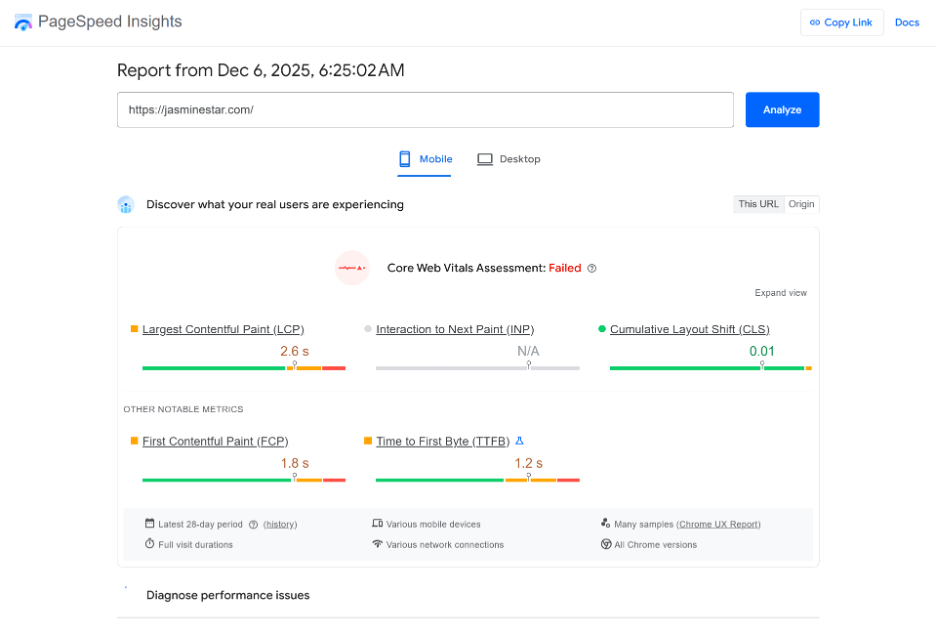
Image Source
PageSpeed Insights
Use only the essential form fields
Ask for the details you need to move someone into the next phase — usually a name, email, and one qualifier. Gather deeper info later through onboarding, surveys, or a follow-up conversation.
Track user engagement metrics that reveal intent
Measure clickthrough rates, scroll depth, and time spent in key sections.
These engagement signals often reveal where revenue opportunities are being lost. Small improvements in page clarity, load speed, or CTA placement can significantly improve campaign ROI over time.
These metrics reveal what’s resonating and where people lose interest.
Make sure to also track conversion rates and which parts of the landing page lead to sales.
(The no-code landing page builders we mentioned earlier can help with this.)
Build a mobile experience that feels natural
Design your landing page experience with mobile users in mind.
Use responsive layouts, large tap targets, and readable text. Test across devices to ensure a seamless mobile site experience.
Wrap up
Strong landing pages feel simple, calm, and easy to say yes to. When your message is clear and your website loads quickly, people are more likely to move forward without hesitation.
With the right no-code tools and this guide, you can build high-converting landing pages on your own — no developer or technical stress required. :)
PS: If you want faster, more reliable landing page performance without dealing with complicated infrastructure setups, SophisticatedCloud can help you build and optimize pages that convert smoothly across devices.
Author Bio:
Ioana Wilkinson
Ioana is a business strategist and content writer for B2B tech and SaaS brands. She also helps aspiring entrepreneurs build remote businesses. Born in Transylvania and raised in Texas, Ioana has been living the digital nomad life since 2016. When she’s not writing, you can catch her snorkeling, exploring, or enjoying a café con leche in Barcelona!
