
What I Learned After Two Months of Using Banana Pro AI (And Why I Almost Gave Up)

I'll be honest: my first week with AI image generation was frustrating.
I expected magic. I got blurry faces, six-fingered hands, and compositions that looked like a fever dream. The gap between what I imagined and what appeared on screen felt insurmountable.
But something kept me trying. Maybe it was stubbornness. Maybe it was the $400 I'd just quoted a client for stock photos I couldn't afford. Either way, I stuck with Banana Pro AI long enough to realize the problem wasn't the tool—it was my expectations.
This isn't a guide to becoming an AI art wizard overnight. It's about what actually happens when you're learning, what nobody tells you upfront, and how tools like the Banana Pro AI Image Generator fit into a realistic creative workflow.
The Myth of "Just Type What You Want"
Most tutorials make it sound simple: describe your vision, hit generate, done.
Reality check: my early attempts with Banana Pro AI produced images that were technically correct but creatively off. A "cozy coffee shop interior" came back looking like a dentist's waiting room with espresso machines.
The issue wasn't the AI. It was me thinking in full sentences instead of visual building blocks.
Here's what changed after about 30 failed attempts:
I stopped writing paragraphs and started listing elements: "warm Edison bulbs, worn leather chairs, steam rising from ceramic mugs"
I learned that "photorealistic" and "cinematic lighting" weren't buzzwords—they were instructions the Banana Pro AI Image Editor actually understood
I discovered that specificity beats vagueness every time
The Text to Image feature in Banana Pro AI doesn't read your mind. It reads your vocabulary. Once I accepted that, my results improved dramatically.
Image to Image: The Feature I Ignored (Then Couldn't Live Without)
For the first three weeks, I only used text prompts. Why bother uploading reference images when AI could "create anything"?
Then I hit a wall with a client project. They wanted product mockups that matched their brand aesthetic—specific angles, lighting, color temperature. My text descriptions kept missing the mark.
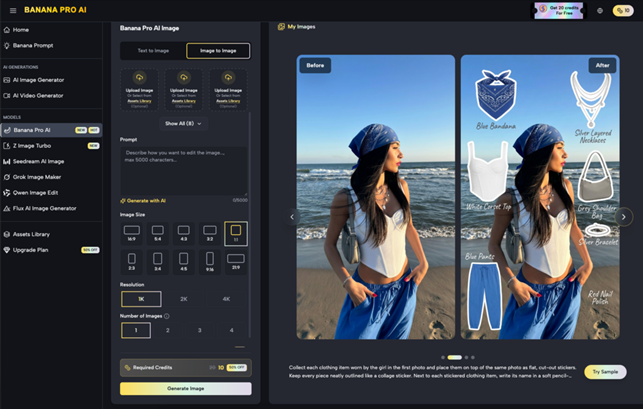
That's when I finally tried the Image to Image function in Banana Pro AI.
I uploaded a rough smartphone photo of their product on a desk. Added instructions: "professional studio lighting, white background, commercial photography style." Ten seconds later, I had something usable.
Not perfect. But usable. And crucially, iterable.
I generated four variations, picked the best one, then used it as a new reference to refine further. By the third round, I had an image that would've cost me $200 from a product photographer.
The lesson: AI image generation isn't about replacing reference material. It's about transforming it faster than you could manually.
The Workflow Nobody Talks About: Iteration Over Perfection
Here's what my actual process looks like now, two months in:
For social media graphics:
Generate 4-6 variations using Text to Image in Banana Pro AI
Pick the two most promising
Use Image to Image to refine each one with adjusted prompts
Export both, test in actual post layouts
Choose the winner based on context, not isolation
For client mockups:
Start with a rough photo or sketch
Upload to Banana Pro AI Image Generator with style instructions
Generate batch of 3-4 interpretations
Select best, use as new reference
Iterate 2-3 times until it matches the brief
For blog featured images:
Text prompt describing the article's mood and topic
Generate multiple options in Banana Pro AI
Quick edits in Canva for text overlays
Done in under 10 minutes
Notice the pattern? I'm not aiming for one perfect generation. I'm using speed and volume to find the right direction, then refining.
This is the opposite of how I used to work with stock photos (scroll for 40 minutes, settle for "close enough") or commissioned illustrations (one shot, expensive, slow).
Three Mistakes I Made So You Don't Have To
Mistake #1: Treating AI like a search engine
Early on, I'd type "marketing team meeting" and expect Banana Pro AI to know I wanted diverse ages, casual dress code, and a bright modern office. It gave me stock-photo-looking corporate stiffness.
Fix: Be absurdly specific. "Three people ages 25-40, casual clothing, laughing around laptop, large windows with natural light, modern minimalist office."
Mistake #2: Ignoring the style presets
I thought manually describing "watercolor style" in my prompt was enough. It wasn't. The style transfer presets in Banana Pro AI apply consistent aesthetic logic I couldn't replicate with words alone.
Fix: Use presets as a foundation, then customize with text prompts.
Mistake #3: Not saving my prompts
I'd generate something great, close the tab, then spend 20 minutes trying to recreate it from memory.
Fix: The Smart Asset Library in Banana Pro AI auto-saves everything, but I also keep a simple text file of prompts that worked. Low-tech, but effective.

When AI Generation Actually Saves Time (And When It Doesn't)
Let's be realistic about efficiency gains.
Where Banana Pro AI genuinely accelerates my work:
Concept exploration: 10 visual directions in 5 minutes vs. hours of mood boarding
Social media volume: 20 post graphics in an afternoon instead of a week
Client revisions: "Make it warmer/cooler/more dramatic" takes seconds, not days
Where it still struggles:
Highly specific technical accuracy (medical diagrams, architectural blueprints)
Consistent character design across multiple images
Text rendering within images (still garbled about 70% of the time)
I'm not replacing human designers for complex brand work. But for content marketing, social media, and rapid prototyping? The time savings are measurable.
A blog post that used to take me 3 hours (including 45 minutes hunting for the right featured image) now takes 2 hours total. That extra hour per post adds up.
What I'd Tell My Past Self Before Starting
If I could go back to day one, here's what I'd say:
Your first 50 generations will be mediocre. That's normal. You're learning a new language.
Don't compare your AI-assisted work to professional photography or illustration. Compare it to what you could've created in the same timeframe without AI.
Banana Pro AI isn't a replacement for creativity. It's a multiplier. Your taste, your judgment, your ability to iterate—those still matter most.
Save everything. Even the failures. You'll learn more from what didn't work than from accidental successes.
And most importantly: the tool is free, so the only cost of experimentation is time. Use that advantage.
Where I Am Now (And Where I'm Going)
Two months in, Banana Pro AI is part of my daily workflow. Not the entire workflow—just a reliable part.
I still hire illustrators for brand identity work. I still use stock photos when I need something instantly recognizable. But for the 60% of visual content that's "good enough" territory, AI generation has become my default first step.
My output has increased. My costs have decreased. My creative confidence has grown because I can test ideas visually without committing resources upfront.
Is it perfect? No. Am I still learning? Absolutely. But the gap between "AI novice" and "competent AI-assisted creator" is shorter than I expected—as long as you're willing to iterate, experiment, and adjust your expectations.
If you're considering trying AI image generation, my advice is simple: start with something free like Banana Pro, give yourself permission to create bad images for the first week, and focus on learning the language of visual description.
The tool will do the rendering. You just need to learn how to ask.
